
/menu say STONKZ SMP, and the scoreboard footer says play.yourserver.net. The rebrand script swaps in your own name and address in one go.
Rebrand on Windows
1
Run the script
Double-click
rebrand.bat. It sits next to the server folder in the package. You can also copy rebrand.bat and rebrand.ps1 into your server’s root folder and run them there.2
Type your name
Enter your server’s name, for example
NEBULA SMP. Press Enter to keep the current one.3
Type your address
Enter your server’s address, for example
play.nebula.gg. A port such as play.nebula.gg:25570 works too. Press Enter to keep the current one.4
Apply it
If the server is already running, restart it, or run
/tab reload and /dm reload.server folder, but you can run it again any time. The script remembers your last name and address in rebrand-current.txt, next to the script, so the next run replaces those. If you move the scripts into your server’s root folder after a rebrand, move rebrand-current.txt with them.
You can also run it from PowerShell with both values at once:
Name and address rules
- Name: up to 24 characters. Letters, numbers, spaces and
.!_-only. Color codes, quotes and placeholders would break the configs, so the script refuses them. - Address: up to 60 characters of letters, numbers, dots and dashes, with an optional
:port.
What it changes
The script checks every file before it writes anything. If you already edited one of these lines by hand, it stops and tells you which file to change yourself. Nothing is half renamed.
Rebrand on Mac, Linux or a host panel
rebrand.bat needs Windows. Elsewhere, edit three spots by hand:
- In
plugins/TAB/config.yml, replaceSTONKZ SMPin both places: the tab header and the scoreboard title. - In the same file, replace
play.yourserver.netat the bottom of the scoreboard. - In
plugins/DeluxeMenus/gui_menus/stonkz_menu.yml, replaceSTONKZ SMPinmenu_title.
/tab reload and /dm reload.
The scoreboard
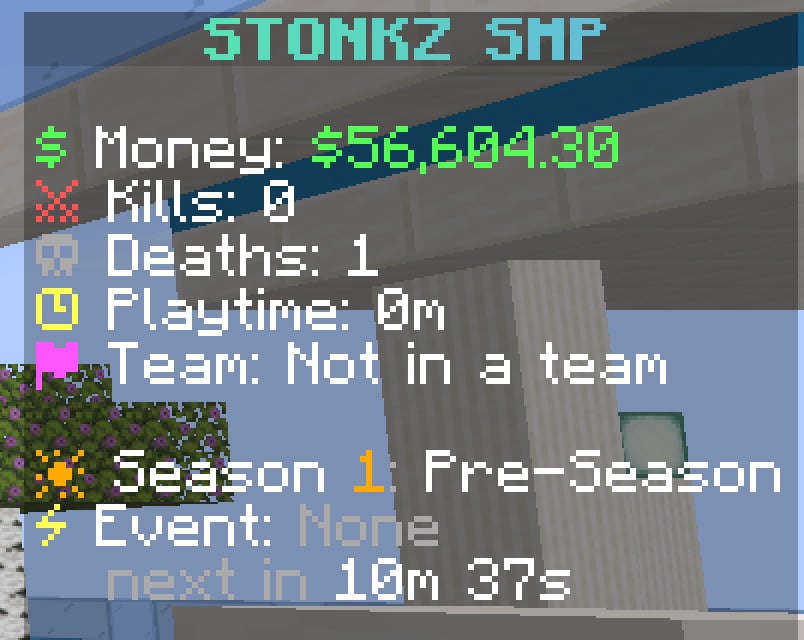
plugins/TAB/config.yml under scoreboard.scoreboards.stonkz. Each line uses a placeholder:
The Event line uses a TAB condition named
stonkz-event. It reads %worldevents_active_plain% and shows ● Live now while any world event runs.
The tab list
The tab list has a branded header with the tagline “Trade the market. Rule the server.” The footer shows online count, ping and TPS, plus quick hints for/menu, /shop, /ah and /rtp. Players are sorted by rank. Edit it under header-footer in plugins/TAB/config.yml.
The main menu
/menu opens a 45-slot menu from DeluxeMenus with buttons for the market, auction house, orders, portfolio, spawner vault, crates, world events, random teleport, homes, spawn, teams, bounties, season and leaderboards. The top shows the player’s balance, team and season kills.
The market button shows live Diamond and Gold prices with trend arrows (%stonkz_price_DIAMOND%, %stonkz_trend_DIAMOND%). Edit it in plugins/DeluxeMenus/gui_menus/stonkz_menu.yml, then run /dm reload.