
gamesmith.admin (ops have it). Build a floor and a small hill first, or use any open area you like.
1
Create a blank game
blank game. It has one phase called play that lasts 300 seconds, and no arena yet. The editor opens on the game’s hub.The hub lists what is missing under a red dye, for example Set the arena region with the wand. Work down that list.2
Select and set the arena
Click Arena, then Wand. You get the Gamesmith wand (a blaze rod).Left-click a block for corner 1. Right-click a block for corner 2. Chat shows each corner and the size. Include everything the match may change, from the lowest floor block to the highest point a player can reach.Run
/gs edit hill, click Arena, then Set arena region. Blocks inside the region are restored after every match.3
Place the lobby and spawns
Still in Arena, stand where players should wait and click Set lobby here. Then stand on each start point and click Add spawn here. Add as many spawns as you like; players take turns through them.Markers use where you stand and the direction you face, rounded to the nearest 45 degrees. The lobby and every spawn must be inside the arena region.
4
Make the hill a zone
Select the hill with the wand: corner 1 on one side, corner 2 on the other, a few blocks up so a player standing on it is inside. Click New zone from selection and name it
hill.Turn on Preview to see the region, markers and zones as particles and floating labels. Only you see them.5
Save a kit
Put a stone sword and a leather chestplate in your inventory. In the hub, click Kit, then Use my inventory. Gamesmith saves exactly what you carry, armour and off-hand included, with enchantments and names.
6
Turn on PvP
In the hub, click Phases & rules, then the
play phase. Click PvP to switch it on. Rename the phase with the card at the top if you like; the name shows on the boss bar.7
Score on the hill
In the phase, click Add rule and pick Player holds a zone. Set zone to
hill. Leave every at 1 and contested at pause, so nobody scores while two players share the hill. Click Done.Click Add action and pick Change score. Leave amount at 1 and target at self. Click Done.Optional: add an Action bar action with the text <gold>+1 on the hill <gray>· <white><score> so players see their score.8
Respawn instead of elimination
Click Add rule and pick Player dies. Add a Respawn action with delay 3.Without a death rule, a player who dies is eliminated and watches the rest as a spectator.
9
Set the win rule and a reward
In the hub, click Win & rewards. Pick First to a score and set Target score to 60.Click Add winner reward and type
xp:50. Add item:DIAMOND 3 too if you like.10
Test it
The hub now shows Ready to play under a lime dye. Click Test. The match starts right away, even if you are alone. Walk onto the hill and watch your score climb.When you are happy, tell players to run
/gs join hill or pick it from /gs.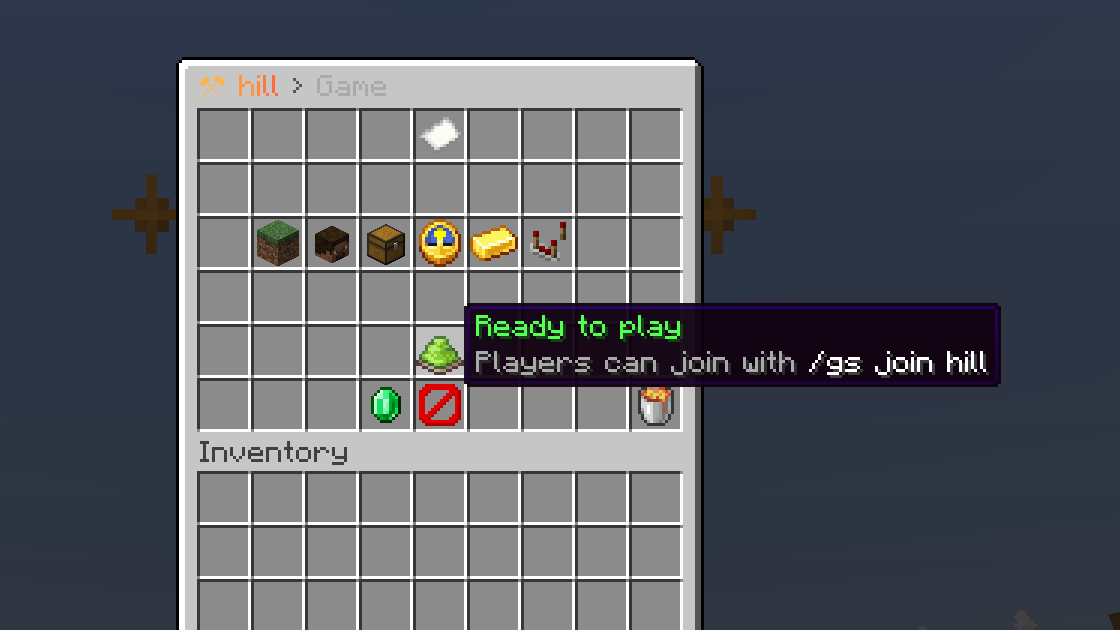
✔ Saved. There is no save button and nothing to reload.
Where to go next
- Add a second phase, such as a one-minute Sudden death with double points. See The editor.
- Split players into teams in Players & teams. Team spawns go in Arena under Add team spawn here.
- Browse every trigger and action in Rules.
- Compare with the
kothpreset:/gs create koth2 koth, then/gs edit koth2.