> ## Documentation Index
> Fetch the complete documentation index at: https://mbcz.mintlify.site/llms.txt
> Use this file to discover all available pages before exploring further.
# Installation
> Install Smply on Paper or Folia, add your license, and apply a preset.
## Requirements
* **Server software:** Paper or Folia `1.20.6` through `26.1.2`
* **Java:** Java 21
* **License:** A paid Smply license key (product id `SMPLY`)
* **Optional:** Vault + an economy plugin, LuckPerms, PlaceholderAPI, TAB
Folia uses the same region-safe scheduler as Paper. After install, `/smply doctor` reports Folia when you are on a Folia host.
## Install Smply
1. Stop your server.
2. Place `Smply-1.0.0.jar` in the `plugins` folder.
3. Start the server once so Smply writes its config files. First boot is **Vanilla+**.
4. Stop the server again.
5. Open `plugins/Smply/config.yml`.
6. Replace `YOUR_KEY_HERE` with your license key.
7. Start the server.
```yaml title="plugins/Smply/config.yml" theme={null}
license_key: "MATT-XXXX-XXXX"
```
Verification runs on startup. `/smply reload` does not re-check the key. An invalid or missing key disables the plugin.
## Claim your license
Join the support Discord and claim the `SMPLY` product license (for example `/claim SMPLY`). Paste the generated key into `config.yml` before running in production.
Claim your license key and get support.
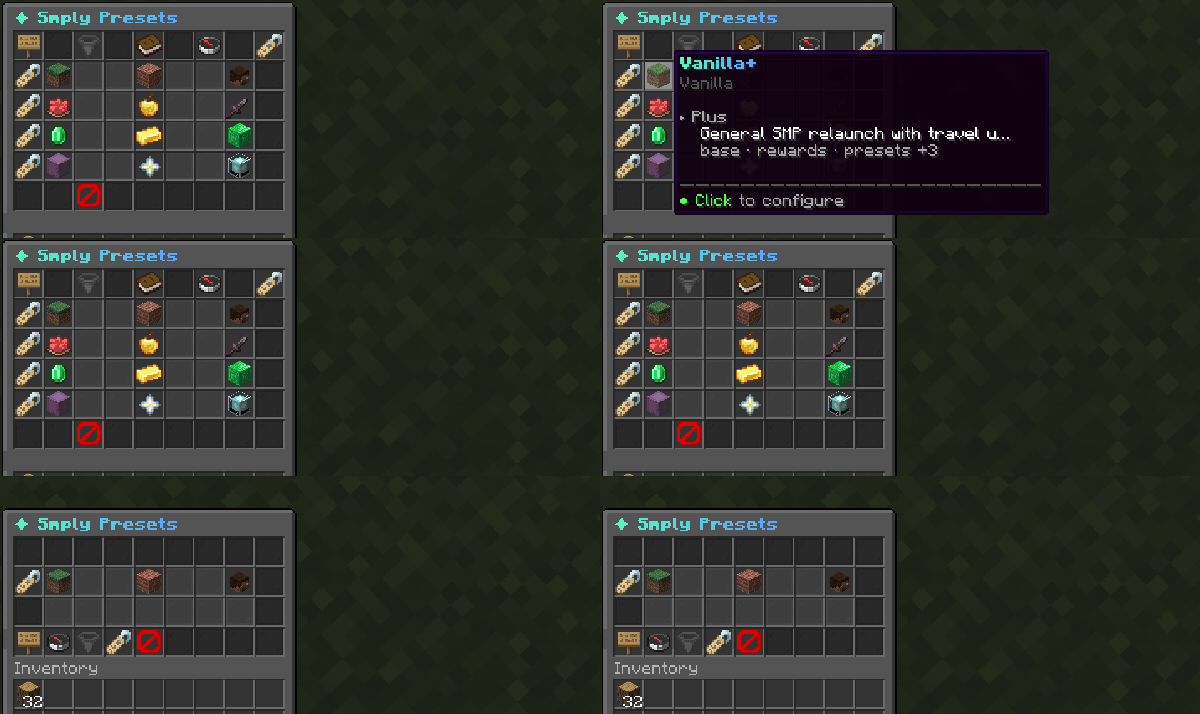
## Pick a preset
Stand in-game (or use console) and apply the niche you are launching:
```text theme={null}
/smply preset lifesteal
```
That turns on Lifesteal modules and merges the bundled blueprint (hearts, combat, HUD, kits, quests).
Keep your existing YAML and only flip modules:
```text theme={null}
/smply preset lifesteal --modules-only
```
Restore official overlay values after you have customized files:
```text theme={null}
/smply preset lifesteal --reset
```
Other presets: `economy_smp`, `boxsmp`, `creator_smp`, `full_suite`. `vanilla_plus` is already the default. See [Presets](/smply/presets).
 ## Set spawn
Stand where players should spawn, then:
```text theme={null}
/setspawn
```
## Open the hub
```text theme={null}
/hub
```
or `/smply menu`. Players land on a 27-slot hub named after `server_name` in `config.yml`.
## First checks
```text theme={null}
/smply doctor
/smply validate
```
`/smply doctor` is the launch check (spawn, Vault, LuckPerms, claims, HUD). `/smply validate` is schema-only. For support tickets, paste `/smply status paste`.
## Recommended stack
Smply is the SMP core you center the server on. You still install:
| Plugin | Role |
| ------------------------------------------------------- | ------------------------------------------------- |
| LuckPerms | Permissions, home limits, rank kits |
| Vault + economy plugin | Paid sell, auction, shop, and bounty charges |
| Claims (GriefPrevention, SimpleClaimSystem, or similar) | Land protection. Optional on griefable Lifesteal |
| PlaceholderAPI | `%smply_*%` for TAB and scoreboards |
| TAB | Full tablist. Smply defers and feeds placeholders |
| CoreProtect | Rollback. Smply does not write those logs |
There is no Essentials or CMI data import. Treat this as a fresh world relaunch.
## Next steps
* Tune `kits.yml`, `rewards.yml`, `hud.yml`, and `messages.yml`
* Enable auction and shop with the `economy_smp` preset, or turn those modules on in `config.yml`
* If you keep Essentials for economy only, disable its overlapping travel commands. See [Integrations](/smply/integrations)
## Set spawn
Stand where players should spawn, then:
```text theme={null}
/setspawn
```
## Open the hub
```text theme={null}
/hub
```
or `/smply menu`. Players land on a 27-slot hub named after `server_name` in `config.yml`.
## First checks
```text theme={null}
/smply doctor
/smply validate
```
`/smply doctor` is the launch check (spawn, Vault, LuckPerms, claims, HUD). `/smply validate` is schema-only. For support tickets, paste `/smply status paste`.
## Recommended stack
Smply is the SMP core you center the server on. You still install:
| Plugin | Role |
| ------------------------------------------------------- | ------------------------------------------------- |
| LuckPerms | Permissions, home limits, rank kits |
| Vault + economy plugin | Paid sell, auction, shop, and bounty charges |
| Claims (GriefPrevention, SimpleClaimSystem, or similar) | Land protection. Optional on griefable Lifesteal |
| PlaceholderAPI | `%smply_*%` for TAB and scoreboards |
| TAB | Full tablist. Smply defers and feeds placeholders |
| CoreProtect | Rollback. Smply does not write those logs |
There is no Essentials or CMI data import. Treat this as a fresh world relaunch.
## Next steps
* Tune `kits.yml`, `rewards.yml`, `hud.yml`, and `messages.yml`
* Enable auction and shop with the `economy_smp` preset, or turn those modules on in `config.yml`
* If you keep Essentials for economy only, disable its overlapping travel commands. See [Integrations](/smply/integrations)